
Hello and welcome to “Beyond the Cell”, where I will share my journey to pivot my skill set from process engineering/business analytics towards data analytics. In my first project, I partnered with Christian Eder – a veteran in the Talent Development space – to present a re-imagined approach to organizational succession planning using Power BI. Enjoy!
Contents
- The Importance of Organizational Succession Planning
- Roadblocks to Effective Succession Planning
- Demolishing Roadblocks with Power BI
- Report Requirements
- Final Product
The Importance of Organizational Succession Planning
Have you ever worked within a stone’s throw of the Corporate world? If so, you have almost certainly heard the phrase “our employees are our most important asset”. While cliché, this message holds a lot of truth, and most would agree that placing highly prepared employees in high-impact roles is a recipe for continued success.
While most organizations try to place the right people in the right positions, they are not always successful. Why is this? McKinsey offers an insightful example in the McKinsey Quarterly:
“When asked to identify the critical roles in his company, the CEO neglected to mention the account manager for a key customer, in part because the position was not prominent in any organization chart. By just about any other criterion, though, this was one of the most important roles in the company, critical to current performance and future growth. The role demanded a high degree of responsibility, a complex set of interpersonal and technical skills, and an ability to respond deftly to the client’s rapidly changing needs.
Yet the CEO was not carefully tracking the position. The company was unaware of the incumbent’s growing dissatisfaction with her job. And there was no succession plan in place for the role. When the incumbent account manager, a very high performer, suddenly took a job at another company, the move stunned her superiors. As performance suffered, they scrambled to cover temporarily, and then to fill, a mission-critical role.”
Source: “Linking Talent to Value“, McKinsey & Company
What a nightmare – and a costly one at that! This example illustrates how effective succession planning is critical to business continuity. We can also see that succession plans must be wide-reaching and holistic – ensuring that all high-value positions are identified as critical roles, not just those at the top of the org chart.

According to the Society for Human Resource Management, effective succession planning helps organizations in several ways:
- Retain highly-specialized institutional knowledge
- Actively identify gaps in skills or training for future leaders
- Boost employee morale (and retention!)
- Save on hiring costs and compensation
Roadblocks to Effective Succession Planning
Despite its importance, companies still struggle with suboptimal succession planning due to manual processes and lack of data-driven insights. As an aspiring data analyst with a background in process improvement, I wanted to understand why.
Fortunately, I had the opportunity to collaborate with Christian Eder – a seasoned Talent Development leader – to understand the challenges organizations face in their succession planning efforts.
How Are Organizations Approaching Succession Planning Right Now?
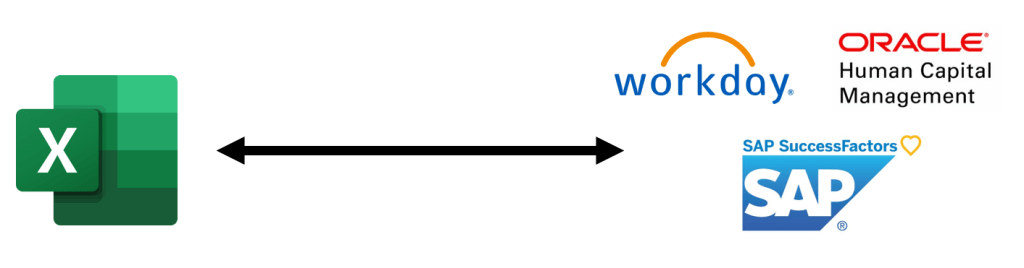
According to Christian, the approach to succession planning can vary widely based on the organization. “On one end of the spectrum”, he explains, “some orgs take a manual approach, using Excel sheets to maintain current critical roles, incumbents, successors. On the other end, some orgs utilize an HRIS (Human Resources Information System) or Talent Management Software that helps succession planning efforts with varying levels of effectiveness.”
He continues, “Many orgs fall somewhere in the middle – receiving some data and insights from their HRIS, but often relying on Excel to record other data and develop more customized insights to fulfill the needs of the organization”.
What are some common challenges experienced by organizations that primarily utilize Excel?
“Many organizations use Excel. It can work, but the key issue is scalability“, Christian contends.
He explains further, “As the organization matures, they’ll want to incorporate more data into their succession planning analysis. This could include basic employee details, retention risk, operational KPI’s, etc. Anything that will help the organization make informed, data-driven decisions”.
“However, with Excel, you quickly reach a point where it’s difficult to incorporate additional data sources effectively. Ultimately, this limits the insights – and overall value – of the succession plan”.

What about orgs that utilize an HRIS? Surely this must help?
“Most orgs have an HRIS – some may even include a recruitment module or talent marketplace. These offer more data management capabilities than an ‘Excel-only’ system.”
It’s not all sunshine and roses though, as Christian explains. “In practice, however, these systems often lack customizable reporting options. This lack of flexibility makes it difficult to align reporting with the organization’s needs. The HRIS company may accept requests for customized reports, but that is always a slow process. As a result, even organizations with an HRIS usually export the data and analyze it in Excel.”

“Lastly”, he remarks, “these approaches remove the data analytics team from the process. Instead of centralizing the Succession Planning data, the data is siloed away from the organization’s existing BI capabilities”.
Demolishing Roadblocks with Power BI
As one of the most data-driven HR professionals I’ve ever met, Christian was quick to suggest that there may be an opportunity to alleviate some of these problems with Business Intelligence software, like Microsoft Power BI. These tools enable users to combine data from multiple sources into robust relational data models and unlock powerful analytics on vast datasets.

In the context of Succession Planning, Power BI can query data from internal Excel sheets and an HRIS, then unite it into one holistic data model. This, combined with its visualization and interactive design options, makes Power BI an excellent tool to transform succession planning into a truly strategic and data-driven process.
Thanks to these capabilities, organizations at any point along the succession planning spectrum can benefit by utilizing Business Intelligence software in their succession planning efforts.
Report Requirements
With Christian’s input as a subject matter expert, we started drafting requirements for a succession plan management report in Power BI. The target audience for this report is the organization’s Senior Leadership team & People function.
In the example report, we assumed that the organization had the following data via Excel sheets or HRIS:
- Annual Succession Planning Evaluations: This is where the organization takes inventory of critical roles and their designated successors. In this case, it also included assessments of employee retention risk and potential.
- Employee Data: Including names, position, and other basic employee information. In the example, this included employee trainings completed, skill profiles, and their most recent review.
- Role Data: A table of critical roles, core skills, and job description.
Note that some of this data could be removed. For example, employee skill profiles aren’t mandatory for a succession plan, but it can offer additional insights that support decision-making. On the other hand, an organization could easily add data to the model too! What if we could view data on performance against sales targets when evaluating successors for a Sales leadership position?
In terms of report characteristics, we aligned on the following requirements through collaborative discussion:
- Critical Role Status: The report must include all “Critical Roles”. Each role should have a traffic-light status to represent the organization’s exposure to business continuity risk.
- Successors: The report must include all “Successors” (employees designated as potential next-in-line for a critical role). Users should also see any additional successor data captured in the review process, such as readiness, capabilities, and potential.
- Employee Profile: A comprehensive employee profile must be available. This should include current position, employee ID, potential critical role career paths, and leadership skill profile.
- Rank Competing Successors to Define “NextGen” Leaders: Users need to know who the 1st option is for any given critical role. If multiple successors are identified for a critical role, they should be ranked based on their readiness, capabilities, and potential.
- #1-ranked successors for each critical role are considered “NextGen”, since they are on-track to be the next generation of employees in the critical roles.
- Leadership Diversity Comparison – Incumbent vs. “NextGen” Groups: The report should help leadership promote diversity and inclusion. It must show the ethnicity, gender, age, and tenure distribution for both incumbent leaders and “NextGen” leaders in 5 years’ time.
- This allows HR leaders to pro-actively identify future diversity gaps and take appropriate actions in their succession planning efforts.
At last, it was time to begin development!
Final Product
After several weeks of data modelling, developing DAX measures, and creating visualizations, the report is complete. I encourage you to tinker with it & explore (click here).
For now, I will just give a brief overview of the report contents. I’ll save the technical aspects for another day.
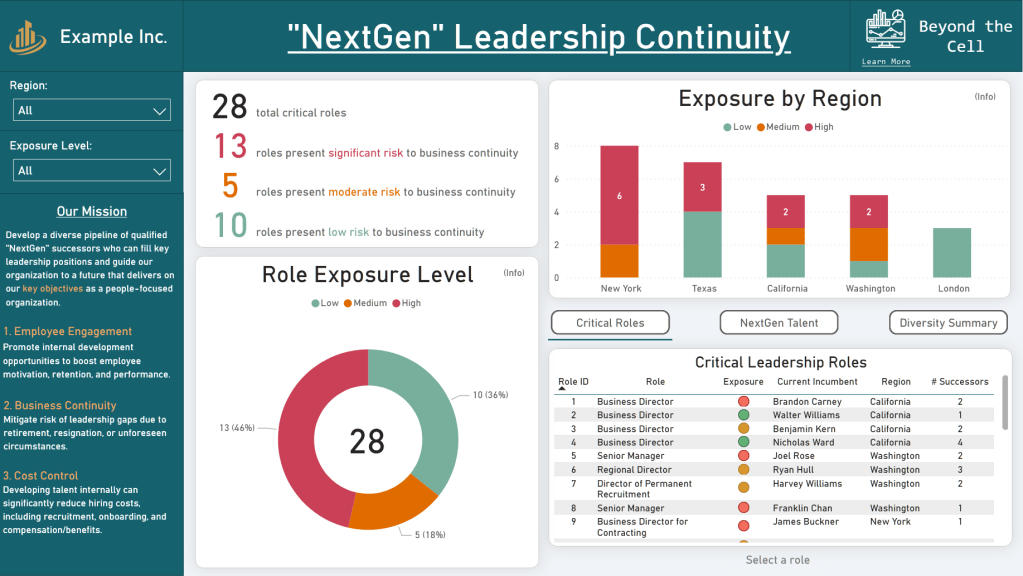
Leadership Continuity Overview
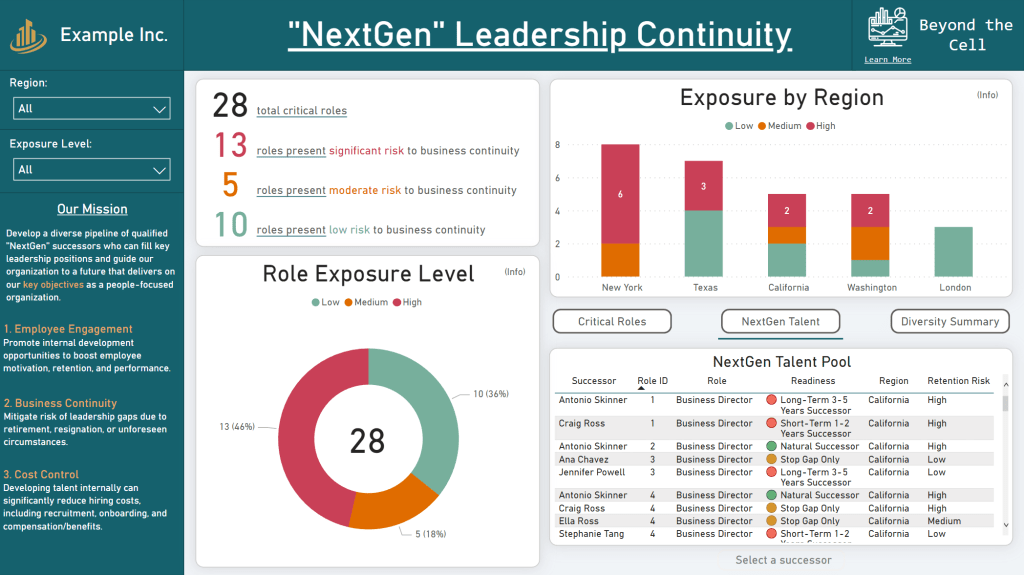
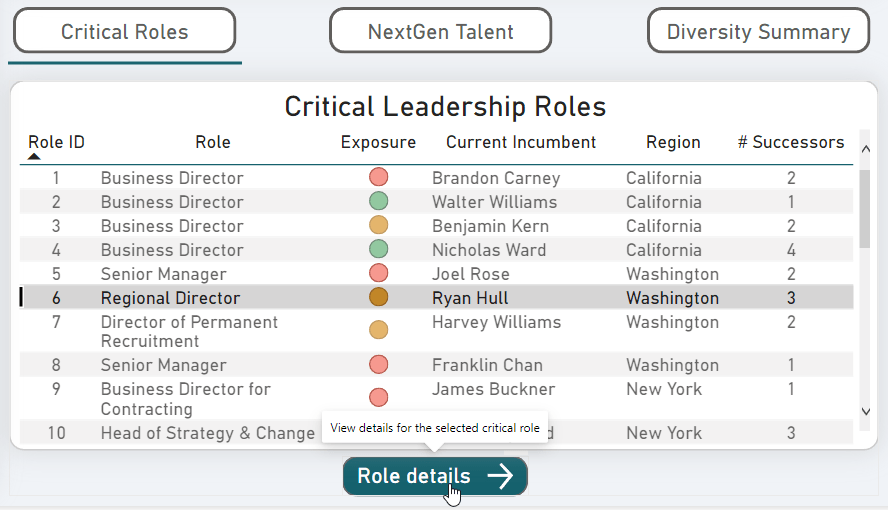
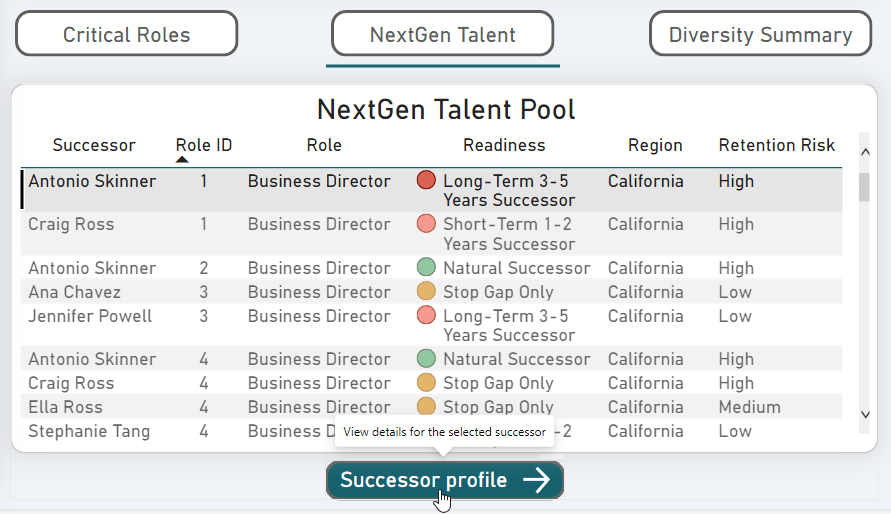
This home page summarizes the organization’s overall exposure to business continuity risk. The bottom right quadrant is a ‘multi-view’ section with varying information based on the user’s selection: “Critical Roles”, “NextGen Talent”, or “Diversity Summary”.
Detailed Leadership Diversity View
This page expands on the summarized diversity metrics from the Overview page. It compares diversity metrics between the Incumbent and NextGen leadership group (assuming NextGen takes over in 5 years).
In other words, this page helps answer: “If each critical role was taken over by its #1-ranked successor in 5 years, how would this impact the diversity of our leadership team?”. This enables organizations to unlock synergies between succession planning and DEI (Diversity, Equity, and Inclusion) efforts.
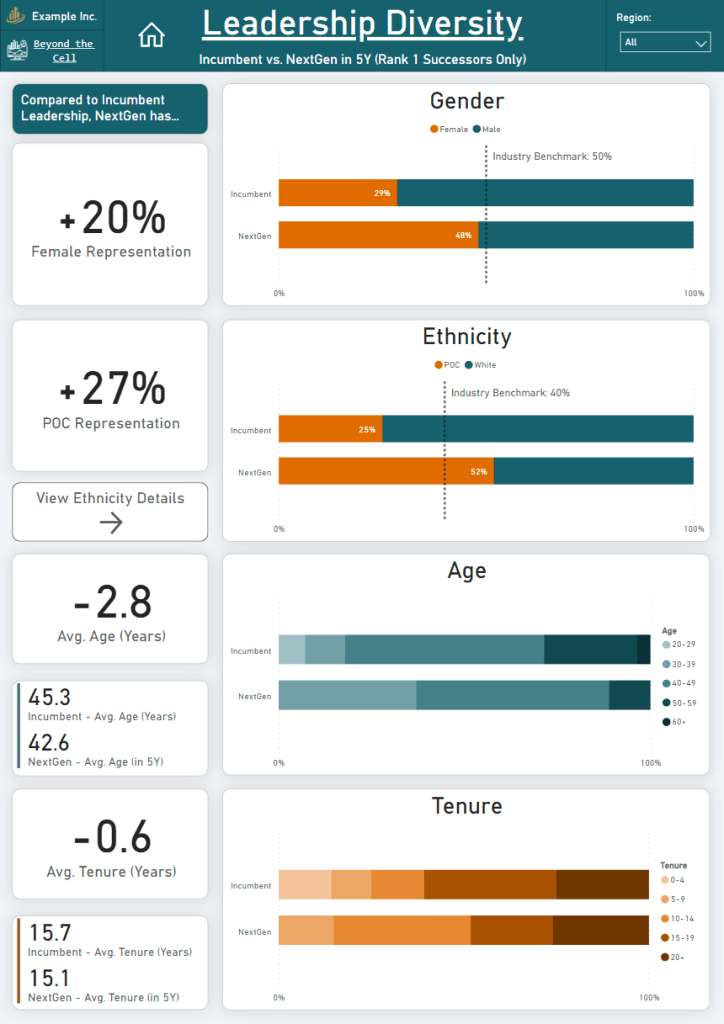
This view is also accessible through the “Overview” page via the “Diversity Summary” multi-view section.

Critical Role Review (hidden from standard page navigation)
A detailed view that zooms into any critical role and shows the designated successors, overall risk to business continuity, incumbent information, and a leadership profile skill comparison between the Incumbent and “NextGen” (rank #1) successor.
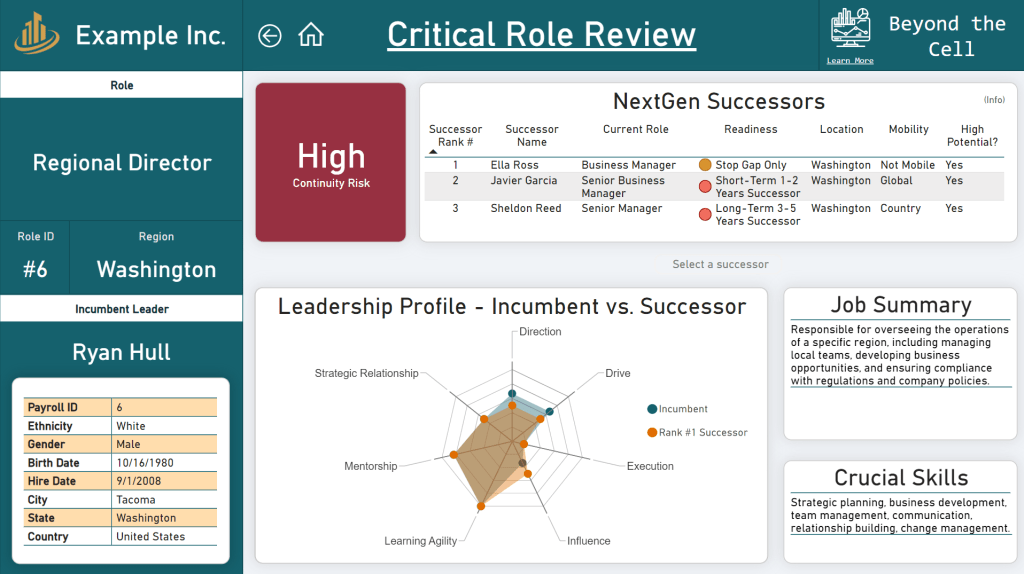
This page must be accessed through the “Overview” page by selecting a row in the “Critical Role” table, then selecting the “Role details” button.
Employee Profile (hidden from standard page navigation)
A detailed view that zooms into an employee and shows their basic bio, career development paths, retention risk, leadership skill profile, and more.
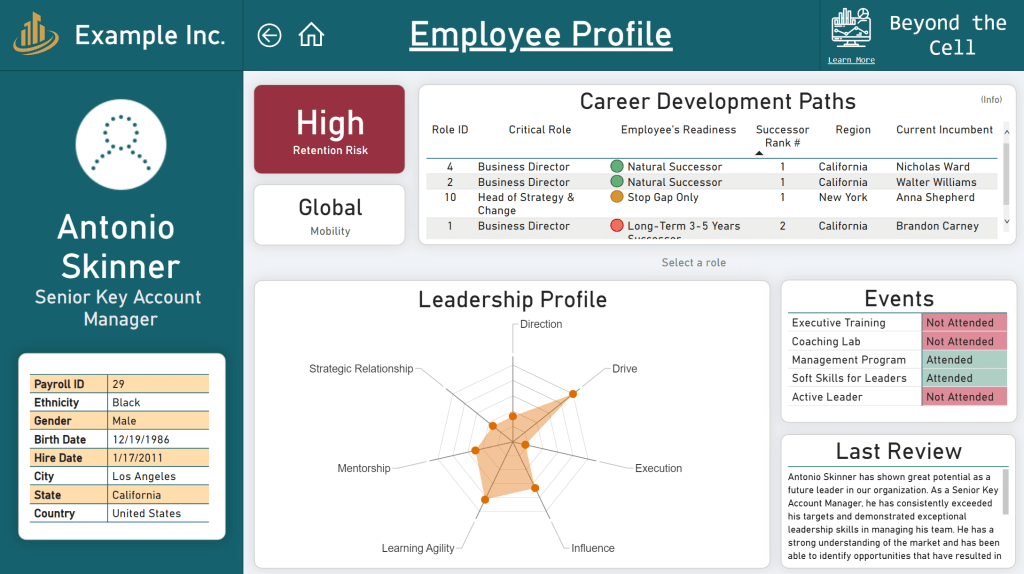
This page must be accessed through the “Overview” page by selecting a row in the “NextGen Talent” table, then selecting the “Successor profile” button.
Final Remarks
In short, I partnered with a seasoned Talent Management professional to develop a re-imagined approach to succession planning using Power BI. Based on the current state of succession planning techniques used in industry, many organizations have a great opportunity to leverage Business Intelligence tools (like Power BI) to effectively model their data and unlock previously-hidden insights.
This approach can help organizations in their journey to:
- Proactively identify and address leadership continuity risks.
- Promote a culture of internal talent development, increasing employee engagement while saving on recruiting, onboarding, and compensation costs commonly associated with external hiring.
- Strategically drive Diversity, Equity, and Inclusion (DEI).
In contrast to other common succession planning approaches – such as manual Excel tracking and HRIS-Excel hybrid methodologies – this method offers:
- Increased data flexibility: In this report, we saw that an effective data model allows organizations to easily incorporate additional data into their succession plan reporting, such as employee reviews, role descriptions, and leadership skill profiles.
- Customized feel & visualizations: BI tools have numerous data visualization options to analyze their succession planning efforts in alignment with the needs of the organization.
- Opportunities for advanced analytics: In this example, we used our dataset to forecast leadership diversity, but this is only scratching the surface. With a robust data model as a foundation, organizations can leverage information from anywhere in their entire data warehouse to discover deeper insights – and even make predictions about the future.
As an aspiring data analyst, I am excited about the potential of BI tools in revolutionizing HR practices. What about you?
As for this blog – I plan to post several follow-ups exploring more technical aspects of this report, including data modeling, DAX expressions, and design techniques. In parallel, I will continue venturing Beyond the Cell to deliver more data-oriented projects that capture insights and drive understanding – stay tuned!
About Me

My name is James McClintock and this is Beyond the Cell, a personal data analysis portfolio.
I am an aspiring Data Analyst who has spent the past several years as a Process Engineer and Business Analyst in the technology and manufacturing spaces. I am passionate about developing highly-polished solutions that support data-driven decision making, allowing my stakeholders to unlock the insights hidden within their data. Content featured here will center around Power BI, SQL, R, and Python.
Let’s venture Beyond the Cell together! Solving problems is a team sport, and I welcome any opportunity to collaborate on your data-focused challenges.
 Beyond the Cell
Leave a comment